Building a Custom MCP Server for Local Tool Access
Learn the exact code structure and decisions required to build an MCP server from scratch.

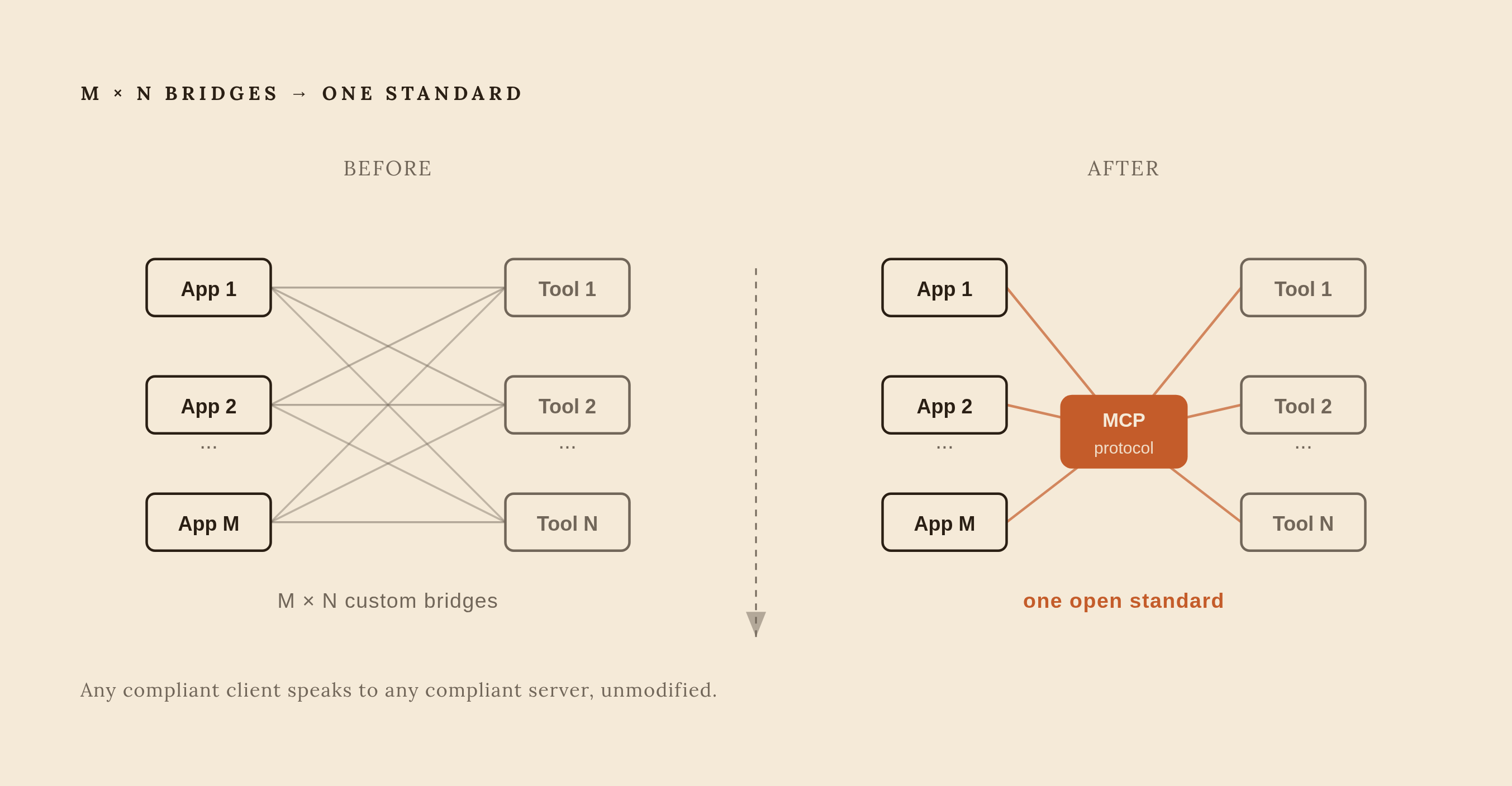
Before this kind of interoperability standard existed, every AI application that wanted to call a tool had to write its own integration for that tool, and every tool that wanted to be callable had to accommodate every application separately. That's an M × N problem: M applications, N tools, and a custom bridge for each pairing, each with its own auth pattern, its own sandboxing rules, its own way of shaping data for the model. MCP replaces that mess with one open standard that any compliant client can speak, so a server built once works with any client that implements the spec, unmodified. Anthropic released MCP in November 2024, and by spring 2025, OpenAI, Microsoft, and Google had all adopted it, cementing it as the default way AI systems reach outside their own walls. Searches for MCP servers have crossed 60,000, which suggests plenty of people are arriving at this exact question right now: how do you actually build one.
This piece walks through that build, layer by layer. Not as theory, but as the sequence of decisions and files a working server actually requires.
The three primitives every MCP server exposes
Every MCP server, regardless of what it connects to, offers the same three kinds of building blocks, and the differences between them affect how the server can be used and secured.
Tools are functions the model can call: search_repos, send_email, run_query. They execute code, so they also carry the widest attack surface of the three primitives. Anything a tool can do, the model can trigger, so tool design is where most of the security thinking has to happen.
Resources are the opposite case: addressable, read-only data the model can fetch, things like file://README.md or db://users/123. They are read-only by design, meaning the model can fetch their contents without triggering actions or mutations.
Prompts sit apart from both. They're reusable, parameterized templates a user invokes by name to shape how the model reasons about a task, rather than data the model consumes or an action it performs.
The useful way to hold these three in mind is by trust profile. Tools execute, resources expose, prompts influence. A server that only offers resources has a much smaller blast radius than one offering tools, and knowing that distinction up front should shape what a server is built to offer at all, not just how it's coded.
How the host, client, and server talk to each other
The chain runs host to client to server to whatever the server actually talks to. The MCP host, Claude Desktop, Cursor, or any other compliant application, never touches a database or an API directly. It holds an MCP client instance, and that client instance talks to the MCP server, and the server is the only thing that ever touches the real data source.
The wire format is JSON-RPC 2.0, and the design takes inspiration from the Language Server Protocol, the same pattern that lets a single code editor support dozens of programming languages through a common interface instead of a hardcoded integration per language. The server advertises what it can do, the client makes requests against that advertised capability set, and the server returns structured results.
This advertising happens during an initialization handshake, in which the client connects, the server responds with a manifest of its capabilities, and the client caches that manifest and hands the tools inside it to the model as available functions it can choose to call.
The 2026-07-28 specification changed something structural here. Protocol-level session tracking is gone. The protocol is now stateless at the transport layer, and instead of the server holding onto session state across a connection, protocol version, client identity, and capabilities travel with every single request inside a _meta parameter. Practically, that means any request can be answered by any server instance sitting behind ordinary HTTP infrastructure, which matters enormously the moment a server needs to run behind a load balancer instead of as a single dedicated process.
Choosing between stdio and Streamable HTTP before writing a line of code
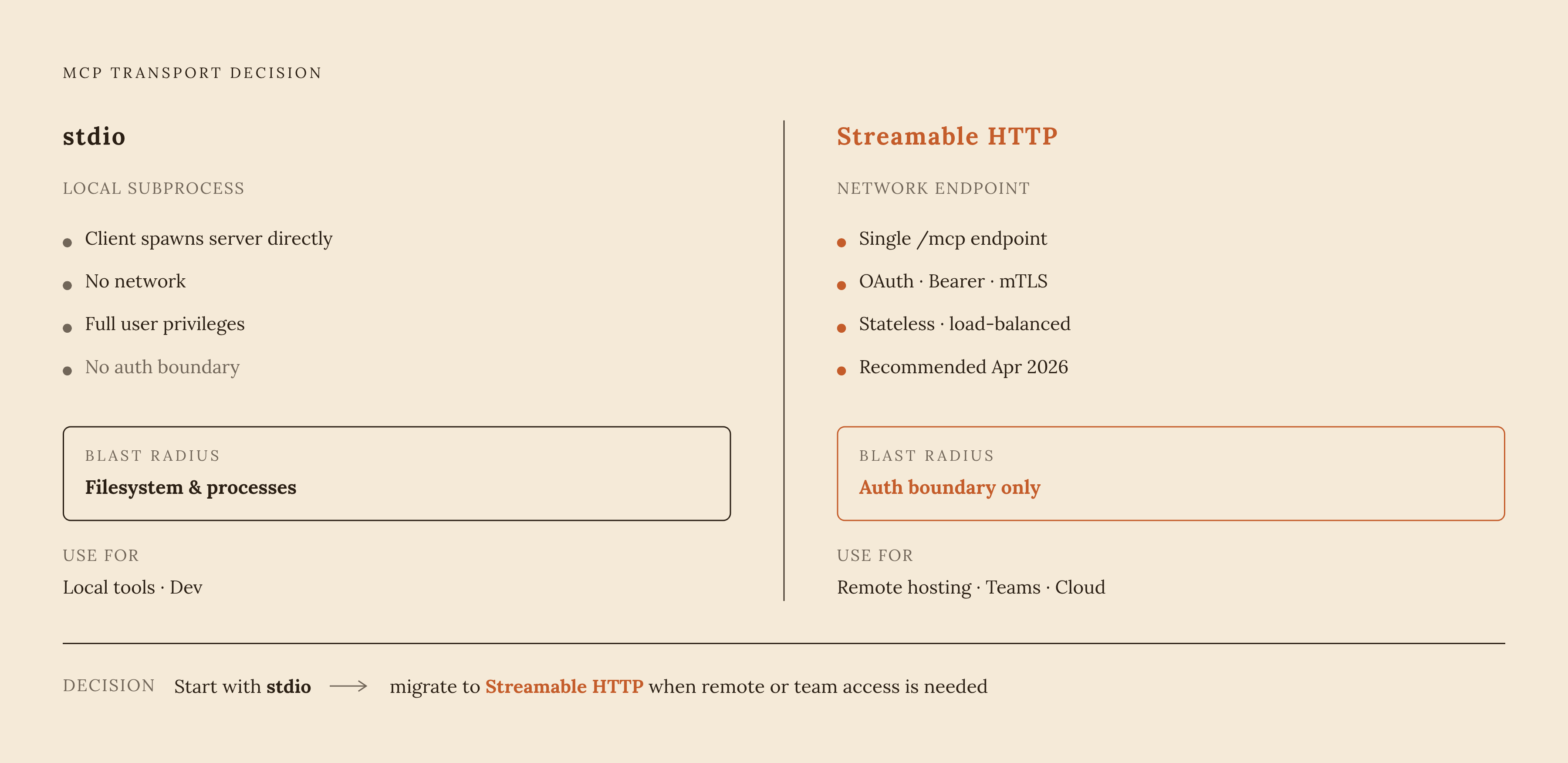
There are exactly two transports in MCP: stdio and Streamable HTTP. Everything else, npm packages, OAuth flows, bearer tokens, .dxt installers, is a distribution or authentication layer sitting on top of one of those two. None of them counts as a third option, and treating them as such is a common source of confusion early on.
stdio works by having the client spawn the server as a local subprocess, and JSON-RPC messages pass between them through stdin and stdout. There's no network connection anywhere in that picture. That makes stdio the right choice for local, single-user tools and for all local development, full stop. It also runs with the full user's privileges: no network auth is required, but anything the process can read, the model can read. That means the blast radius of a stdio server is defined by the filesystem and process permissions of whoever is running it, not by any access control the server itself defines.
For stdio servers, never write to stdout. Doing so corrupts the JSON-RPC stream that stdin and stdout are carrying, and the fix is to log through the standard library's logging module, which writes to stderr instead.
Streamable HTTP is the newer of the two, introduced in the 2025-03-26 revision and replacing the older HTTP+SSE transport, which is being phased out across major providers. New servers should build on Streamable HTTP exclusively rather than the older SSE approach. It runs through a single MCP endpoint, with optional Server-Sent Events available for server-to-client streaming, and it's the only real option once a server needs remote hosting, shared team access, or a cloud-hosted agent on the other end. It also sits behind whatever authentication a team configures, OAuth, bearer tokens, mTLS. This means more setup work but a tighter, more deliberate blast radius than stdio's ambient trust. As of April 2026, Streamable HTTP is the officially recommended transport in the MCP specification.
The decision rule that follows from all this is simple: start with stdio for local development and single-user tools, and migrate to Streamable HTTP once remote access or team-wide availability is actually a requirement.
Setting up the project: language, SDK, and environment
The two supported runtimes are Python 3.10 or higher and Node.js for TypeScript. Python has two real SDK paths, and they're not interchangeable.
The official modelcontextprotocol/python-sdk, maintained by Anthropic, installs with uv add "mcp[cli]" and currently ships mcp 2.0.0. It gives low-level control over the spec, supports the full range of transports, and stays current with protocol changes as they land.
FastMCP, created by Jeremiah Lowin (also the founder of Prefect), takes a Flask-like decorator approach and is the fastest route to a working server. Its current release as of September 5, 2026 is FastMCP v4.0.3, but it installs mcp 1.29.0 as a transitive dependency, a full major version behind the official SDK. The two packages don't just differ in API style. They ship different underlying protocol libraries, and this detail only bites once a feature from the newer spec version doesn't behave the way the FastMCP docs suggest it should.
A third option is FastAPI-MCP, which turns an existing FastAPI application into an MCP server with a single import, relevant mainly to readers who already have a FastAPI service running and want to expose it rather than build something new from scratch.
Reach for FastMCP when prototyping or building a local stdio server, and reach for the official SDK when raw spec control matters or when tracking the latest protocol changes is a requirement rather than a nice-to-have.
On the TypeScript side, @modelcontextprotocol/sdk is the standard choice, and it's the better fit when a server is headed for Cloudflare Workers, Vercel Edge, or another Node-based deployment target. Schema declaration in the TypeScript SDK runs through Zod.
Getting a Python project running with uv looks like this:
uv init weather && cd weather
uv venv && source .venv/bin/activate  # macOS/Linux, or .venv\Scripts\activate on Windows
uv add "mcp[cli]"
touch weather.py
Writing the server: defining tools, resources, and the entry point
A server starts with an import and an instance: from mcp.server import MCPServer, followed by mcp = MCPServer("weather"). From there, the class leans on Python type hints and docstrings to auto-generate tool definitions, which is most of what makes the high-level SDK fast to work with.
Defining a tool means decorating a function with @mcp.tool(), giving it a clear name like get_forecast or get_alerts, and writing a docstring that actually describes what the tool does, because that docstring is what the model reads to decide when calling the tool makes sense. Typed parameters round out the definition. The SDK infers the JSON Schema for the tool's inputs directly from the function signature, so there's no manual schema-writing step in either FastMCP or the official SDK's high-level API. The function returns structured output, and the client passes that output back to the model as the tool's result.
A concrete example: a weather server exposing two tools, get_alerts and get_forecast, both of which call the National Weather Service API using httpx, which is already a transitive dependency of the SDK and so requires no extra installation step.
Resources follow a different registration pattern. A read-only handler gets registered against a URI pattern, something like weather://forecast/{city}, and it returns data with no side effects: no mutations, no writes out to anything else.
Prompts register similarly to resources, as parameterized templates, but their job is different again: they shape how the model reasons about the data it's already received, rather than fetching new data or performing an action.
Testing the server with MCP Inspector before connecting a client
MCP Inspector launches the server process and connects to it over stdio exactly the way Claude Desktop or Cursor would, and it shows the actual JSON-RPC messages moving back and forth in real time. That visibility is the whole reason to use it before touching any client configuration.
Running it involves invoking the Inspector against the server process, a TypeScript server and a Python one each have their own invocation form. If the Inspector connects cleanly and shows the server's tools correctly, then any failure that appears afterward, once a real client is involved, lives in the client configuration. Not the server.
A wrong absolute path to the executable, a missing environment variable the server expected to find, and a stray console.log or print() statement that's quietly polluting stdout and corrupting the JSON-RPC stream. All three appear clearly in an Inspector session, so running it first saves time later.
Connecting the server to Claude Desktop over stdio
Inside Claude Desktop, the "Edit Config" button in the Developer sidebar creates or opens the configuration file directly. On macOS that file lives at ~/Library/Application Support/Claude/claude_desktop_config.json; on Windows it's %APPDATA%\Claude\claude_desktop_config.json.
Every path in that config needs to be the full absolute path to the executable. Claude Desktop launches servers with a minimal PATH environment, so short commands that work fine in a terminal, npx, docker, and so on, fail silently when Claude tries to spawn them the same way.
Claude Desktop reads this config file once, at startup, and spawns each configured server as a subprocess, discovering its available tools through the same initialization handshake described earlier. There's no hot reload here: config changes do not take effect until the app is relaunched.
As of early 2026, Claude Desktop also supports Desktop Extensions, .dxt files that package a pre-built MCP server for double-click installation, with no JSON editing and no PATH issues to troubleshoot. That path matters most when a server needs to reach non-technical users who shouldn't have to touch a config file.
Changes when moving to Streamable HTTP for shared or remote access
Moving from stdio to Streamable HTTP is not a matter of swapping one line of config. It changes the shape of the whole deployment. Instead of a client spawning a subprocess it fully controls, a client now opens a connection to a single MCP endpoint that has to be reachable over the network, authenticated, and available whether or not any particular client happens to be running at that moment.
That network exposure is why authentication stops being optional. Where stdio inherits the trust boundary of the local user account, Streamable HTTP sits behind whatever auth scheme gets configured, OAuth, bearer tokens, mTLS, and that scheme becomes the actual security boundary for the server rather than an afterthought layered on top of it.
The stateless design introduced in the 2026-07-28 specification makes this transport viable for shared infrastructure. Because protocol version, client identity, and capabilities travel with each request rather than living in server-side session state, a Streamable HTTP server can sit behind a standard load balancer with multiple instances answering requests interchangeably, the same way any stateless HTTP API would. That's the structural difference that turns a personal, single-user tool into something a team, or a fleet of cloud-hosted agents, can share without each one needing its own dedicated server process.